
A missed call can mean a lost consultation, an empty appointment slot, or a prospective customer choosing a competitor. Yet many businesses still rely on reception staff to answer every enquiry, check calendars, collect client details, and send confirmations while handling other responsibilities.
A virtual AI receptionist for appointments can automate much of this process. It can answer incoming calls or messages, understand scheduling requests, check availability, create bookings, and send confirmations. However, its reliability depends on more than conversational AI: it also needs accurate calendar integrations, clear booking rules, privacy controls, and a dependable way to hand complicated requests to a person.
This guide explains how virtual AI receptionists work, when ready-made tools are sufficient, when custom development makes sense, and what businesses should evaluate before investing in an automated scheduling system.
What Is a Virtual AI Receptionist?
A virtual AI receptionist is a software system that interacts with customers through voice or text and helps manage routine front-desk tasks. Depending on the product, it may answer phone calls, respond to website enquiries, collect contact information, schedule appointments, handle cancellations, and route complex requests to staff.
Unlike a basic chatbot that only provides information, a scheduling-focused receptionist must take action in connected business systems.
For example, a prospective client might call a consultancy and say, “Can I book a 30-minute discovery call next Tuesday afternoon?” The system needs to understand the requested duration, identify the relevant service, check available slots, confirm the client’s time zone when necessary, and create the booking only after the details are agreed.
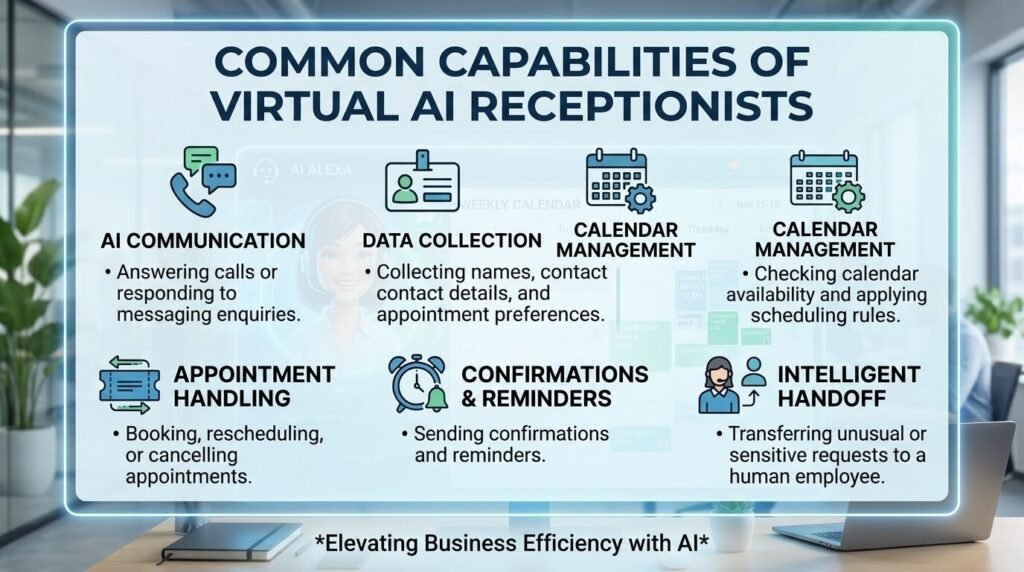
Not every AI receptionist supports all these features. Businesses should verify the capabilities of a specific product rather than assuming that a conversational interface can complete every scheduling task.
How Automated Appointment Scheduling Works
A reliable scheduling workflow connects the customer conversation to the systems that control real availability.
1. Understand the request
Speech recognition or text processing converts a customer’s request into structured information, such as service type, preferred date, duration, and contact details. If a request is unclear, the system should ask a follow-up question rather than guess.
2. Check availability
The receptionist queries the connected calendar or booking platform. It must consider working hours, staff availability, appointment duration, buffers between bookings, holidays, and existing reservations.
3. Confirm the booking
Before creating an appointment, the system repeats the essential details and obtains confirmation. It then sends a booking request to the scheduling system and checks whether the operation succeeded.
4. Send follow-up communications
After a successful booking, the system can send confirmation details and reminders through supported channels. Rescheduling and cancellation requests should update the original appointment rather than accidentally creating duplicates.
5. Escalate when needed
If the request involves an exception, a complaint, an uncertain booking, or a task outside the system’s permissions, it should route the customer to a staff member with the relevant conversation context.
The key principle is simple: the AI should not merely say an appointment is booked; the connected scheduling system must confirm that the booking was actually created.
Ready-Made AI Receptionist vs. Custom Development
The right approach depends on how closely your scheduling process matches standard business workflows.

A ready-made tool is often the sensible starting point for a small business that needs standard bookings and uses a supported calendar. A custom solution becomes more relevant when scheduling depends on proprietary software, multiple locations, complex service eligibility, unusual pricing rules, or a customer portal.
Custom development does not automatically produce a better or cheaper result. It introduces responsibility for integration maintenance, security, monitoring, and future improvements. Choose it when the additional control solves a meaningful business problem.
Where Virtual AI Receptionists Create Value
Different businesses need different scheduling workflows.
- Professional services: A consultancy could use an AI receptionist to qualify enquiries, collect project requirements, and book discovery calls. Requests involving unusual contracts or sensitive discussions can be escalated to a team member.
- Clinics and wellness providers: A scheduling assistant might offer available appointment slots, manage cancellations, and send reminders. Healthcare businesses must carefully assess privacy, access controls, vendor arrangements, and applicable legal requirements before processing patient information.
- Home and field services: A maintenance company may need to collect a service address, understand the type of job, and allocate a suitable technician. This requires more than a calendar: the system may need service-area rules, job-duration estimates, and staff availability.
- Multi-location businesses: A company operating across several branches needs location-aware availability, consistent booking policies, and correct time-zone handling. A booking that looks valid in one calendar can still fail if another system uses different rules.
These examples are illustrative. The appropriate workflow depends on the business’s actual operating requirements and existing systems.
Common Mistakes When Automating Client Scheduling
1. Treating every conversation as a successful booking
A customer may ask about a time without agreeing to it. Require explicit confirmation and a successful response from the booking system.
2. Ignoring calendar conflicts
Availability can change between the initial check and the booking request. Use the scheduling platform’s authoritative availability and handle conflicts by offering another slot.
3. Designing only for ideal conversations
Customers may change dates mid-sentence, give incomplete details, interrupt the AI, or request something outside normal business hours. Test these situations rather than only scripted demonstrations.
4. Making cancellation and rescheduling unreliable
Duplicate appointments and outdated calendar entries damage trust. Define how the system identifies the original booking, verifies the customer where appropriate, and confirms successful changes.
5. Collecting unnecessary personal information
Only collect information needed for the booking and business process. Limit access, define retention rules, and assess the security of connected systems. Healthcare providers in the United States should evaluate applicable HIPAA obligations when protected health information is involved; using AI does not remove those responsibilities.
6. Leaving no human handover
Customers should have a clear path to a person when the system is uncertain or the request needs judgement. Escalation should include enough context to avoid making the customer repeat everything.
7. Skipping real-world quality testing
Test accents, background noise, mobile connections, calendar failures, duplicate requests, time-zone changes, and unavailable services. Monitor booking accuracy and escalation rates after launch, not just the quality of the AI’s responses.
How to Build a Reliable AI Scheduling System
A practical implementation process starts with the business workflow, not with a choice of AI model.
- Discovery and requirements: Document the channels customers use, appointment types, booking rules, existing calendar software, escalation requirements, and success measures.
- Architecture and integration: Decide how voice or messaging, the AI layer, scheduling APIs, customer records, and notifications will communicate. Define authentication, permissions, logging, and failure handling.
- Development: Build the conversation flow, availability checks, booking confirmation, cancellation handling, and human handover. Keep business rules in controlled application logic instead of relying on the AI to remember them from a prompt.
- QA and testing: Validate normal journeys, ambiguous requests, conflicting bookings, API downtime, privacy controls, and accessibility. Include end-to-end tests that verify actual calendar changes.
- Deployment and optimization: Begin with a limited workflow or location, review real interactions, and expand after the system meets agreed reliability criteria. Track completed bookings, failed booking attempts, escalation frequency, and customer feedback.
This staged approach helps businesses identify integration and workflow problems before expanding automation across every customer channel.
When Should You Hire a Dedicated Development Team?
Internal development may be enough when your team already understands the scheduling platform, has available engineering capacity, and only needs a small integration.
External engineering support becomes useful when the project requires several skills at once—for example, backend integration, frontend or customer-portal work, AI orchestration, automated testing, and deployment engineering. It can also help when the product roadmap is already full and the scheduling project would otherwise delay higher-priority work.
The challenge is not simply connecting an AI model to a calendar. It is building a dependable product around that connection: one that respects business rules, handles failures, protects customer data, and remains maintainable as requirements change.
A dedicated software development team can provide ongoing engineering capacity across planning, development, integration, QA, and maintenance. Before choosing a provider, evaluate technical experience, communication practices, ownership of code and documentation, testing standards, security responsibilities, and the process for handling changing requirements.
NextPak provides dedicated developers and engineering support for businesses that need to extend delivery capacity. Depending on the scope, a project may require full-stack development, AI integration, and QA expertise working alongside the client’s existing team. Explore NextPak’s dedicated development and staff augmentation options to assess whether this model fits your roadmap.
Frequently Asked Questions
Can an AI receptionist book appointments automatically?
Yes, if it is connected to a scheduling system with permission to create or update bookings. The system should confirm availability, obtain the necessary customer confirmation, and verify that the booking succeeded.
Is a virtual AI receptionist suitable for a small business?
It can be, particularly when the business receives repetitive enquiries and uses a supported calendar. Compare the subscription cost and setup effort with the time saved and the value of fewer missed enquiries.
Can an AI receptionist integrate with existing software?
Many tools provide standard integrations or APIs, but support varies. Confirm compatibility with your calendar, CRM, phone system, payment workflow, and customer database before committing.
Is custom AI receptionist software better than a ready-made tool?
Not always. Ready-made products are usually preferable for standard scheduling. Custom development is worth evaluating when unique workflows, integrations, control requirements, or product differentiation justify the additional cost and maintenance.
How do businesses protect customer information?
Collect only necessary data, restrict access, use appropriate security controls, assess third-party vendors, and define retention and deletion policies. Businesses handling regulated information should obtain suitable compliance advice before deployment.
How long does implementation take?
A basic configuration may be completed relatively quickly, while custom software can require discovery, integration work, testing, and staged deployment. The timeline depends on the number of systems, complexity of booking rules, and security requirements.
Turn Appointment Automation Into a Dependable Product
A virtual AI receptionist can make scheduling more accessible, but its value depends on what happens after the conversation begins. Accurate availability, reliable integrations, clear escalation, and thorough testing determine whether automation improves the customer experience or creates more administrative work.
If your scheduling workflow requires custom integrations or your engineering team lacks the capacity to deliver it alongside existing priorities, start by defining the required workflows, systems, risks, and success measures. Then discuss your requirements with NextPak to evaluate the engineering support needed for a maintainable solution.
Build a Reliable AI Appointment Scheduling Solution
Need more than a standard scheduling tool can provide? NextPak’s Dedicated Software Development Teams can help you develop custom calendar integrations, business-specific booking workflows, automated testing, and supporting applications.
Whether you’re connecting an AI receptionist to existing systems or building a more advanced scheduling solution, the right engineering approach can help make your workflow more reliable and maintainable.
Discuss your project requirements with NextPak to explore the technical expertise and development capacity your business needs.