
A missed inbound call can mean a lost lead, a delayed appointment, or a customer who decides to contact a competitor. Hiring additional reception staff is not always practical, but automating every conversation without considering its complexity can create a different problem: callers receive answers that sound convincing but fail to resolve their needs.
That is why choosing an AI receptionist requires more than comparing voice quality, advertised features, or monthly prices. Businesses need to evaluate how well a solution understands callers, completes real tasks, connects with existing systems, and recognizes when a human should take over.
This guide explains how to evaluate the best AI receptionist for inbound calls, compare ready-made platforms with customized solutions, and determine what your business needs before committing to an implementation.
What Makes an AI Receptionist Worth Choosing?
The right AI receptionist should do more than answer the phone. It should move the caller toward a useful outcome.
Depending on your business, that might mean answering routine questions, qualifying a sales lead, booking an appointment, checking service availability, routing a call, or recording information for a follow-up.
Start by defining your intended outcomes. A small consultancy may need appointment booking and lead capture, while a multi-location business may require location-aware routing, multilingual support, and integration with several internal systems.

Six Factors to Evaluate Before Choosing a Platform
1. Conversation quality and response speed
An AI receptionist must understand callers in realistic conditions. Test whether it can handle background noise, incomplete sentences, corrections, pauses, and callers who change their minds.
Response delays matter too. A technically correct answer can still produce a poor experience if the caller repeatedly waits through awkward silences. Voice-agent latency depends on several components, including speech recognition, language-model processing, speech generation, and network transmission. Twilio’s voice AI guidance explains why these delays need to be assessed across the complete conversation pipeline.
What to test: Ask the same question in several ways, interrupt the agent politely, correct an earlier detail, and observe whether the conversation recovers naturally.
2. Integrations and actual task completion
A receptionist that captures a caller’s name but cannot update your CRM may simply move the administrative work elsewhere.
Check whether the platform can connect to your existing phone system, calendar, CRM, ticketing platform, or scheduling software. Confirm whether integrations are native, available through middleware, or require custom API development.
Test the complete workflow. For example, booking an appointment should involve checking availability, confirming the correct time zone, creating the booking, and communicating the result to the caller. A successful-sounding conversation is not proof that the appointment was actually saved.
3. Human handoff and exception handling
Not every call should be automated. Complaints, unusual requests, uncertain answers, and high-value sales conversations may require a person.
Evaluate whether the AI can transfer callers to the correct team, provide useful context to the receiving employee, and handle situations where nobody is available. Define fallback behavior for failed transfers, unavailable systems, and requests outside the agent’s authority.
A good escalation process protects the customer experience while keeping automation useful.
4. Security, privacy, and access controls
Inbound calls may contain names, phone numbers, appointment details, payment-related information, or sensitive customer disclosures.
Review how call recordings and transcripts are stored, who can access them, how long they are retained, and which third-party services process the information. For businesses operating across the USA and UK, evaluate the privacy and sector-specific obligations relevant to their locations and customers.
Do not assume that a vendor’s security statement automatically makes your complete implementation compliant. Data flows, permissions, retention settings, and contractual responsibilities also matter.
5. Reliability and monitoring
Ask what happens when an API fails, the calendar becomes unavailable, or call volume suddenly increases.
Look for monitoring, error logs, reporting, configurable fallback routes, and clear support arrangements. If your phone system is business-critical, understand the vendor’s service commitments and how incidents are communicated.
Evaluate real performance under realistic call loads rather than relying only on a polished demonstration.
6. Total cost and measurable value
The subscription price is only one part of the cost. Depending on the product, additional expenses may include usage charges, telephony, integrations, setup, support, and ongoing maintenance.
Estimate total monthly cost using your expected call volume and average call duration. Then compare it with the value of calls successfully handled, appointments booked, leads captured, and staff time released.
Use a simple calculation:
Net monthly value = measurable benefits − total operating costs.
Avoid treating every automated call as a saving. A call that requires an employee to correct an error or repeat the same work may create little benefit.
Ready-Made AI Receptionist or Custom-Built Solution?
For many businesses, a ready-made platform is the sensible starting point. Custom development becomes more relevant when standard tools cannot support essential workflows or integrate reliably with existing systems.
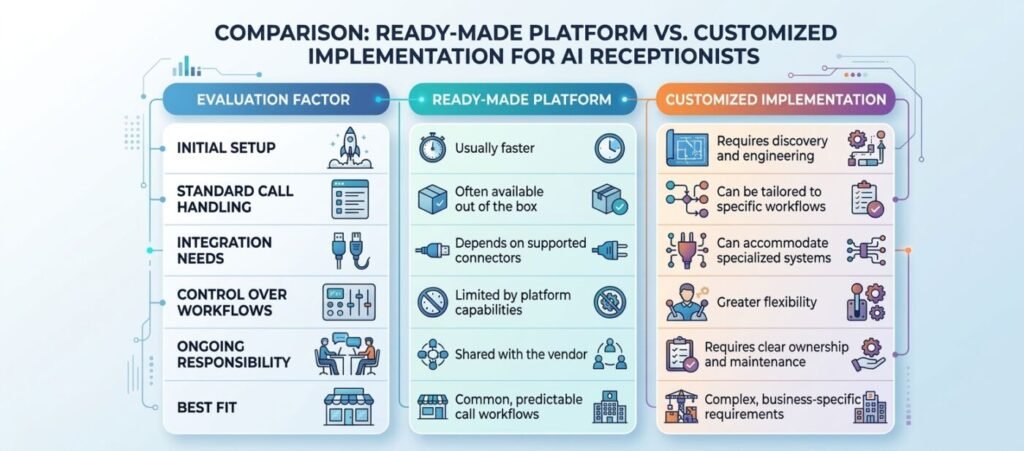
Consider three hypothetical scenarios:
- A small professional services firm needs after-hours answering and appointment booking. A ready-made platform may cover the requirements without a custom build.
- A growing service business needs the receptionist to check availability across several locations and update an existing CRM. A standard tool may work if it supports those integrations; otherwise, a customized integration may be justified.
- A larger organization needs complex routing, internal data access, audit trails, and specialized escalation rules. A configurable platform combined with dedicated engineering may provide a more suitable path than a standalone subscription.
The goal is not to customize everything. It is to identify which requirements are essential and choose the simplest solution that satisfies them.
How to Test an AI Receptionist Before Deployment
Run a structured pilot before routing all business calls through the system.
Step 1: Map the call journeys. Document common reasons for calling, the information required, permitted actions, and the conditions that require a human.
Step 2: Prepare realistic test cases. Include routine questions, appointment changes, unclear requests, incorrect information, interruptions, and requests the agent must refuse or escalate.
Step 3: Verify system actions. Check actual calendar entries, CRM records, notifications, and transfers instead of relying on the agent’s spoken confirmation.
Step 4: Test failure conditions. Simulate unavailable integrations, invalid inputs, failed transfers, and unexpected requests. Confirm that the system fails safely.
Step 5: Measure results. Track task completion, transfer success, factual accuracy, caller abandonment, response delays, and cost per successfully resolved call.
Step 6: Improve and retest. Review failed conversations, adjust instructions and workflows, and repeat the tests before expanding deployment.
Common mistakes include choosing a platform based only on price, assuming natural-sounding speech means accurate answers, overlooking integration limitations, automating sensitive calls without appropriate safeguards, and launching without a baseline for comparison. A controlled pilot helps uncover these problems before they affect a larger share of customer interactions.
When Dedicated Software Development Teams Become Useful
The challenge is not always finding an AI receptionist. It may be making that receptionist work reliably within your existing business operations.
When standard products cannot meet essential requirements, businesses may need custom API integrations, specialized workflow logic, monitoring dashboards, automated testing, or connections to legacy applications. This is where software engineering becomes relevant.
A dedicated software development team can help assess technical requirements, implement integrations, build supporting components, test edge cases, and maintain the solution as business needs change. Depending on the project, the work may involve backend development, full-stack engineering, QA and testing, and ongoing optimization.
NextPak’s Dedicated Software Development Teams service is relevant when your requirements extend beyond a straightforward off-the-shelf setup. Before selecting a development partner, clarify who owns the architecture, how quality will be measured, what documentation will be delivered, and how maintenance and handover will work.
If your requirements are still simple, start with an existing platform. If integration gaps, operational complexity, or business-specific workflows are preventing reliable automation, evaluate whether dedicated engineering support would close those gaps.
Frequently Asked Questions
What is the best AI receptionist for inbound calls?
There is no universal winner. The best option depends on call volume, workflow complexity, integration requirements, budget, security needs, and whether callers must be able to reach a human. Compare shortlisted platforms using the same test scenarios.
Can an AI receptionist book appointments automatically?
Yes, if the platform supports calendar integration and the required booking actions. Test availability checks, time zones, duplicate bookings, cancellations, and confirmation messages before deployment.
Can an AI receptionist connect to my CRM?
Many solutions support selected CRM integrations, but capabilities vary. Verify whether the platform can create and update records, capture call outcomes, trigger follow-ups, and handle API errors.
Is a custom AI receptionist better than an existing platform?
Not automatically. Existing platforms are often preferable for standard workflows. Custom development is worth considering when critical integrations, control requirements, or specialized processes cannot be handled adequately by available tools.
How do you measure AI receptionist performance?
Track successful task completion, factual accuracy, appropriate human transfers, caller abandonment, response latency, integration errors, and total cost per resolved call. Review results against a baseline and your business objectives.
When should a business hire a dedicated software development team?
Consider one when the project requires specialized integrations, custom workflows, supporting applications, systematic QA, or ongoing engineering capacity that your internal team cannot reasonably provide.
Choose Call Automation That Fits Your Business
A successful AI receptionist implementation starts with clear requirements, realistic testing, and measurable outcomes. Compare platforms on what they can actually accomplish, confirm that integrations work, and preserve a reliable route to human support.
If your call automation plans involve complex integrations or workflows that standard platforms cannot support, explore NextPak’s Dedicated Software Development Teams to assess the engineering capacity your project may need.
Build Reliable AI Call Automation Around Your Business Workflows
Need more than a standard AI receptionist platform can offer? NextPak’s Dedicated Software Development Teams can provide engineering support for custom integrations, business-specific workflows, automated testing, and supporting applications.
Discuss your requirements with NextPak to determine the right technical approach for your call automation project.