
A missed call can mean a lost appointment, an unanswered sales enquiry, or a customer who chooses a competitor. For businesses handling calls throughout the day, answering every enquiry promptly while managing routine administrative work can be difficult.
An AI receptionist for business can help by answering incoming calls, responding to common questions, collecting caller information, scheduling appointments, and routing requests to the right person. However, the real value depends on more than a natural-sounding voice. The system must understand business rules, access the right information, connect with existing software, and recognize when a human needs to take over.
For founders, CTOs, and product managers, the important decision is whether an existing solution meets operational requirements or whether a more tailored system is necessary.
What Is an AI Receptionist for Business?
An AI receptionist is a software system that handles selected front-desk interactions using technologies such as speech recognition, conversational AI, text-to-speech, and business-system integrations.
Unlike a traditional answering service that records messages or follows fixed scripts, an AI receptionist can interpret a caller’s request and respond conversationally within defined boundaries.
Depending on its capabilities, it may:
- Answer incoming calls and provide business information.
- Handle frequently asked questions about services, locations, and opening hours.
- Schedule, reschedule, or cancel appointments.
- Capture contact details and qualify enquiries.
- Route calls based on department, urgency, or request type.
- Send confirmations and follow-up messages.
- Record interaction summaries in a CRM or other business system.
The key distinction is workflow execution. A system that only answers questions offers a different level of functionality from one that can securely check availability, create a booking, update a customer record, and confirm the result.
Why Businesses Are Adopting AI Receptionists
The strongest use cases begin with a measurable operational problem rather than the desire to adopt AI for its own sake.
1. Fewer missed opportunities
Businesses receiving enquiries outside office hours or during busy periods may struggle to answer every call. An AI receptionist can provide an initial response, capture the caller’s requirements, and arrange an appropriate next step.
2. Less repetitive administrative work
Confirming appointments, answering standard questions, and collecting basic information can consume staff time. Automating predictable interactions gives employees more room to handle complex requests and customer relationships.
3. More consistent information
A receptionist connected to an approved knowledge source can provide standardized answers about services, policies, and operating hours. Its information must still be maintained and tested; AI can produce incorrect or outdated responses if its underlying sources are unreliable.
4. Better handling of call volume
A well-designed system can manage multiple routine interactions without requiring a separate employee for every call. Actual capacity depends on the telephony platform, concurrent-call limits, response latency, and the complexity of each workflow.
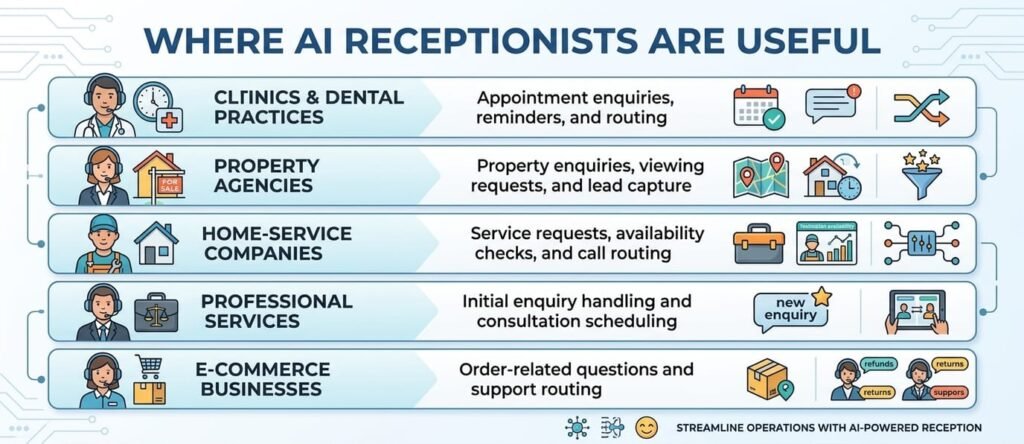
These are potential applications, not guarantees of performance. Suitability depends on the business’s call patterns, customer expectations, software systems, and risk tolerance.
How an AI Receptionist System Works
A reliable AI receptionist combines several components into a coordinated workflow.
- Call handling: A telephony service receives the call and connects it to the AI system.
- Speech recognition: The caller’s speech is converted into text or another machine-readable representation.
- Intent and context processing: The AI interprets the request, identifies relevant details, and determines what information or action is needed.
- Business logic and integrations: The system checks approved data sources or calls authorized tools—for example, a scheduling API or CRM endpoint.
- Response generation: The system creates an appropriate reply and converts it into spoken audio.
- Logging and escalation: The interaction is recorded according to the business’s policies. Calls that exceed the system’s capabilities can be transferred to a person or queued for follow-up.
Consider a caller requesting an appointment. The system should identify the service and preferred time, check actual availability, confirm the caller’s details, create the booking only after the necessary information and authorization are obtained, and communicate the result. It should never claim that an appointment is confirmed when the scheduling system has not verified it.
This is why integration design, error handling, and reliable state management matter as much as conversational quality.
Off-the-Shelf vs Custom-Built AI Receptionists
Not every business needs to build its own AI receptionist. The right choice depends on how closely existing products fit the required workflow.

Choose an existing product when it supports your call flows, scheduling tools, reporting needs, and privacy requirements with minimal customization.
Consider custom development when the receptionist must coordinate several internal systems, support complex routing rules, operate within specialized business processes, or provide functionality that existing products cannot reasonably deliver.
A hybrid approach is also possible: use an existing voice or AI platform while developing custom integrations, workflow orchestration, and business-specific features.
Limitations, Risks, and Common Mistakes
An AI receptionist should not be treated as an infallible employee. Speech recognition can fail with background noise, accents, interruptions, or poor connections. AI-generated answers can be incorrect, and integrations can fail even when the conversation sounds successful.
Avoid these common mistakes:
- Automating everything immediately. Start with predictable, low-risk calls before introducing complex requests.
- Using outdated business information. Maintain approved knowledge sources and define who updates them.
- Ignoring human escalation. Establish clear transfer rules for complaints, emergencies, uncertainty, and sensitive matters.
- Connecting systems without access controls. Apply authentication, least-privilege permissions, and appropriate audit logs.
- Measuring calls answered instead of outcomes. Track successful bookings, qualified enquiries, resolution rates, and unnecessary transfers.
- Skipping real-world testing. Test interruptions, unclear speech, unavailable appointments, duplicate requests, API failures, and callers who change their minds.
- Overlooking privacy. Assess what personal information is collected, where it is stored, who can access it, and how long it is retained.
Privacy, transparency, security, and accountability should be addressed throughout the system lifecycle. The US National Institute of Standards and Technology provides a voluntary AI Risk Management Framework for identifying and managing AI risks. Its principles can help teams structure risk assessment, testing, and ongoing monitoring. See the NIST AI Risk Management Framework.
Businesses serving customers across the US, UK, or other jurisdictions should also assess applicable privacy, call-recording, consumer-protection, and sector-specific requirements before deployment.
How to Implement an AI Receptionist
A practical implementation process begins with the workflow, not the AI model.
Step 1: Map incoming calls
Identify the most common requests, peak periods, current handling process, and reasons callers need a human.
Step 2: Define measurable goals
Establish baseline figures for missed calls, booking completion, response time, transfers, and staff workload. Set realistic targets based on business priorities.
Step 3: Choose the architecture
Select a suitable telephony provider, speech and AI components, knowledge sources, integration approach, and hosting model.
Step 4: Design permissions and workflows
Specify what the system can read, what it can change, which actions require confirmation, and when it must escalate.
Step 5: Integrate business systems
Connect the receptionist to approved scheduling software, CRM records, customer-support platforms, or internal APIs. Include validation, retry behavior, and failure handling.
Step 6: Test before release
Evaluate conversation quality, task completion, security, privacy, response latency, accessibility, and fallback behavior.
Step 7: Deploy gradually
Start with a limited set of call types or a pilot period. Keep a human fallback available while performance is evaluated.
Step 8: Monitor and improve
Review failed interactions, caller feedback, transfer reasons, and business outcomes. Update workflows and knowledge sources as requirements evolve.
When Do You Need a Dedicated Software Development Team?
An off-the-shelf product may be sufficient for a small business with straightforward call handling. A dedicated development team becomes more relevant when the AI receptionist is part of a larger software product or business-critical workflow.
You may need additional engineering capacity when your project requires:
- Custom telephony, CRM, scheduling, or ERP integrations.
- Backend APIs, authentication, and permission management.
- Full-stack interfaces for managing call flows and business settings.
- QA for conversational edge cases, integration failures, and regression risks.
- Ongoing monitoring, infrastructure management, and feature development.
The challenge is not simply connecting a voice model to a telephone line. It is building a dependable system around it: one that respects business rules, protects customer information, records actions correctly, and fails safely.
NextPak’s Dedicated Software Development Teams service is relevant when your business needs additional engineering capacity to build or extend this kind of solution. Depending on the project scope and agreed engagement, a team can contribute to backend development, full-stack implementation, integration work, and quality assurance.
Before selecting a provider, evaluate its experience with API-driven systems, AI integration, security practices, testing, documentation, and ongoing maintenance. Confirm responsibilities, technical ownership, deliverables, and support expectations before development begins.
Build an AI Receptionist Around Your Business Needs
The right AI receptionist is not necessarily the one with the most features. It is the one that solves a defined operational problem, integrates with your systems, and delivers results that you can measure.
If existing products cannot support your required workflows, a custom solution may offer the flexibility you need. Start by documenting your call journeys, integrations, security requirements, and success metrics. Then determine whether you need a configurable product, targeted custom development, or a dedicated engineering team.
Need additional engineering capacity to develop an AI receptionist or another AI-powered business system? Explore NextPak’s dedicated software development team approach and discuss the technical skills your project requires.
Ready to Build an AI Receptionist for Your Business?
Automating business calls requires more than a conversational AI tool. Your solution may also need reliable API integrations, secure customer-data handling, appointment management, workflow automation, and thorough quality testing.
NextPak’s Dedicated Software Development Teams can help you explore the engineering capacity needed to build or extend an AI-powered business solution aligned with your technical requirements and operational goals.
Whether you need custom integrations, backend development, full-stack implementation, or QA support, the right team structure depends on your project scope and existing systems.
Planning an AI receptionist or call-automation project? Discuss your requirements with NextPak to explore the development approach and technical capabilities your business needs.